The RevList by Revlis
Can ChatGPT Analyze TikTok and Instagram Videos
ChatGPT cannot analyze TikTok and Instagram videos, which is when Revlis comes in handy. Revlis will analyze videos in a way no other tool currently can.
You paste a competitor's TikTok account into ChatGPT and ask a reasonable question:
“Look at their last 30 posts. Tell me what they are doing differently, why the outliers worked, and what I should test.”
What you want is not a list of captions. You want somebody to do the work you would do if you had a few hours: watch the videos, notice what happens in the opening, compare the strong posts with the normal ones, and turn that into a useful strategic direction.
Instead, you may get a version of: I can help if you provide the video, transcript, screenshots, or relevant information. Or it may pull what it can from a page without actually giving you the account-level video research you meant.
That is frustrating, but it is not ChatGPT failing at what it was built to do. It is a mismatch between the job you have and the inputs the workflow reliably gives it. ChatGPT is what I like to call a "horizontal tool." It's meant to help people across a wide range of industries so when you get very specific with how it can help you with a specific job, it can't actually help you in the way you need it to.
People ask for this constantly. One ChatGPT user said it “can’t actually watch videos”; another trying to analyze TikTok links said it was “not going through the TikTok videos.”[1][2] The real request behind both complaints is simple: I do not want to manually rebuild the video and the account before AI can help me think about it.
Can ChatGPT analyze a TikTok or Instagram video?
ChatGPT can help analyze material you supply. Give it a transcript, screenshots, captions, comments, a short brief, performance numbers, or your own notes, and it can help you organize the information, think through a pattern, develop an angle, or write a script.
But a TikTok or Instagram link is not the same as a complete social-video research workflow.
OpenAI's standard image-input guidance describes static images, not a documented process for giving ChatGPT a public TikTok or Instagram account and having it reliably watch every post, hear the audio, interpret the edits, collect the account history, and compare the patterns across the account.[3] ChatGPT may have other modes, browsing access, or future capabilities depending on the plan and product surface. That still does not change the practical question: how much research do you have to assemble before it can give you the answer you want?
For a single idea, that can be fine. For competitor research, client work, or a serious content strategy, it gets heavy fast.
What people are actually trying to do
Most people are not asking, “Can ChatGPT summarize this transcript?”
They are asking things like:
“Can it analyze both videos and creator statistics?”[4]
“Can it grab the last 30 videos and show me the pattern?”[5]
“What is happening in the video—not just what was said?”[6]
“Why did this one work when the rest of their account did not?”
Those are account-research questions. They require the post itself, the way it unfolds, the account it came from, and a comparison set.
If you are a social media manager, that may mean a client wants a competitor report. If you are a founder, it may mean you want to understand what is making competitors feel more compelling than you. If you are a creator, it may mean you have 20 saved Reels and no clean way to turn them into ideas you can actually use.
The workaround people end up doing
Here is what “analyze this competitor account in ChatGPT” often becomes in practice.
1. Collect the posts yourself
You find the account, choose the posts that look important, copy links, download videos if needed, pull captions, or make a list of views and dates.
Already, you have had to decide which content is relevant. You may not know yet which posts are actual outliers and which are simply popular-looking from the outside.
2. Turn a moving video into separate inputs
Then you take screenshots of the opening, pull a transcript, write down the audio, describe the cuts, and explain what the person is doing on screen.
One user looking for help analyzing video was advised to manually break the video into frames.[7] Another discussion about video understanding separates the transcript from the visual events the person actually wanted explained.[6-1]
There is nothing wrong with that workaround. It is just a lot of work if the reason you opened ChatGPT was to avoid manually breaking down every video. At this point, you are doing it the old fashioned way.
3. Write the prompt that explains the missing context
Now you tell ChatGPT what the account is about, who the audience is, which posts performed well, what the caption says, what the video looks like, and what you want it to compare.
The quality of the answer depends on the quality of that assembly. If you forget that an abrupt edit happens at three seconds, that one video uses a harsh sound interruption, or the creator's normal posts usually perform very differently, the model cannot include that detail in the analysis.
4. Repeat the process for every post you want to compare
One post is manageable but when it gets to thirty posts, this becomes a small research project. This is where the job stops being “use ChatGPT to analyze a video” and becomes “manually prepare a dataset, then ask ChatGPT to help reason about it.”
That is why people describe getting metadata, titles, or transcript-level information when what they wanted was the actual video and the account pattern around it.[2-1][8]
Why a transcript and a few screenshots can miss the thing that matters
The transcript is not useless. It tells you the language. A screenshot is not useless either. It shows you one visual moment.
But social video is not made of one kind of signal.
Imagine an opening where one person asks a calm question, the video cuts hard at 0:03, a second person answers with a sharp command, large text appears on screen, and the viewer now needs to know why that answer could be true. A transcript may make it look like a simple question and answer. A screenshot may show two people talking.
What holds attention is the relationship between the pieces: the pace, the interruption, the sound, the visual shift, the stakes, the curiosity gap, and then whether the rest of the post pays that question off.
This is where experienced marketers often have the feeling that an AI answer is almost right. It has the topic. It may even identify a hook. But it misses the detail that determines whether an idea is a hit or a flop.
You also need to know whether the post was actually unusual
Even a strong analysis of one post can lead you in the wrong direction if you do not know the account context.
Was it an outlier? What is the creator's normal performance range? Are their best posts consistently using the same structure, message angle, audience tension, or emotional energy? Are there similar posts that did not work? Did the video win because of a repeatable creative pattern, or because it was connected to a timely conversation?
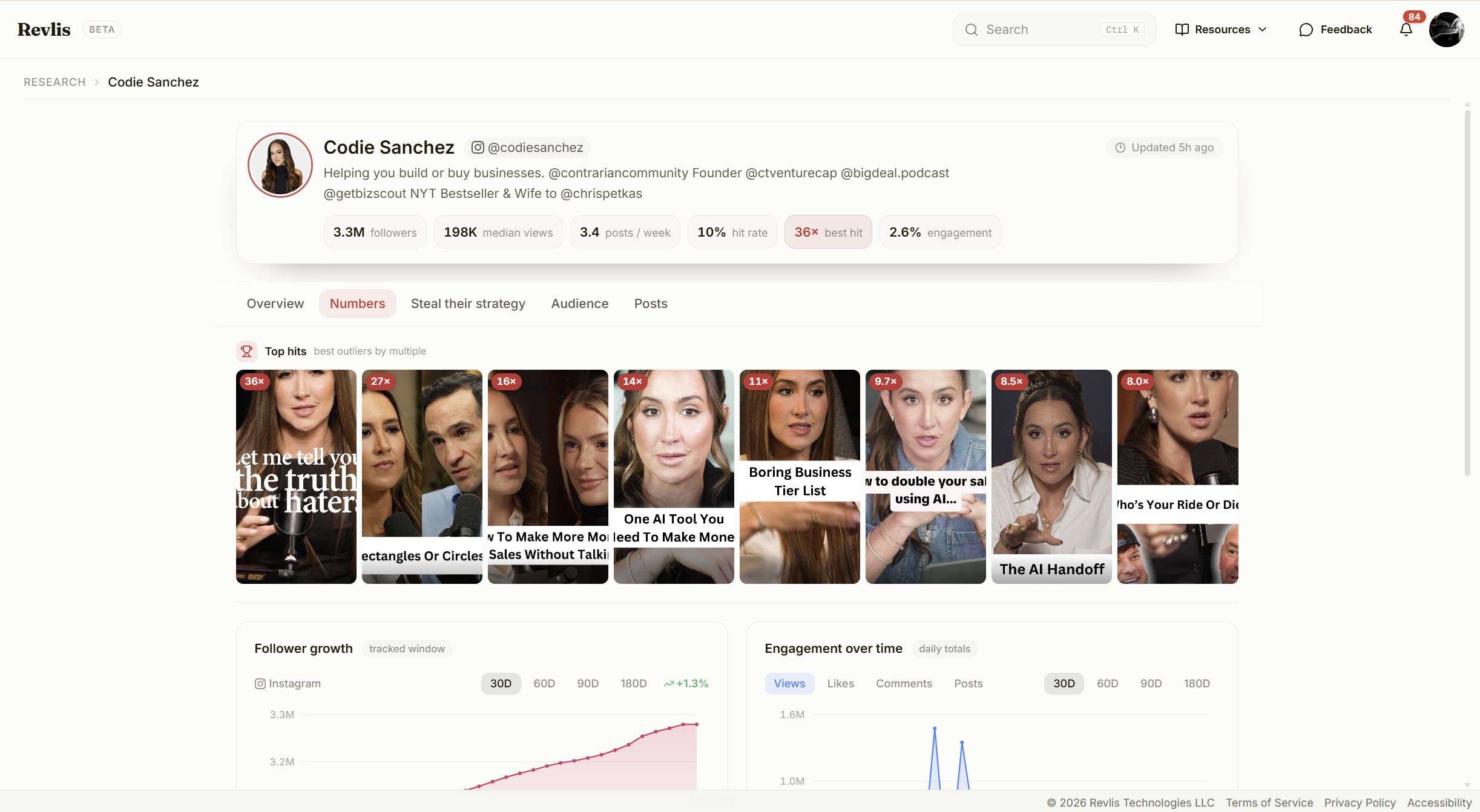
The Revlis account view above changes the question from “What did this one video say?” to “What is this creator repeatedly doing when the content hits?” It shows the top outliers alongside formats, emotional signature, audience context, posting behavior, and the rest of the post library.
That is the difference between a nice observation and usable strategy.
Now imagine this repeated by across every competitor account you want to track and analyze.
What Revlis does with the work before the prompt
Revlis is built for the moment you need more than a general answer. It is designed around expert organic-social strategy: the psychology, creative decisions, and account context that determine what is worth testing next.
For a public TikTok or Instagram account, Revlis studies approximately the latest 100 posts in a run. It analyzes every normal post and deeply analyzes the first five seconds, so you can see the account's broader hook language without treating every video like a full forensic report.
When a post is an outlier, Revlis applies its deep analysis across the entire video. If you import one video directly by link, that video receives deep analysis as well.
The breakdown does not reduce a post to a transcript. It can bring together:
the visual and on-screen text;
spoken audio and the audio hook;
transcription and language;
sentiment and emotional signals;
pacing, cuts, structure, curiosity, and payoff; and
the post's place in the account's normal performance and creative patterns.
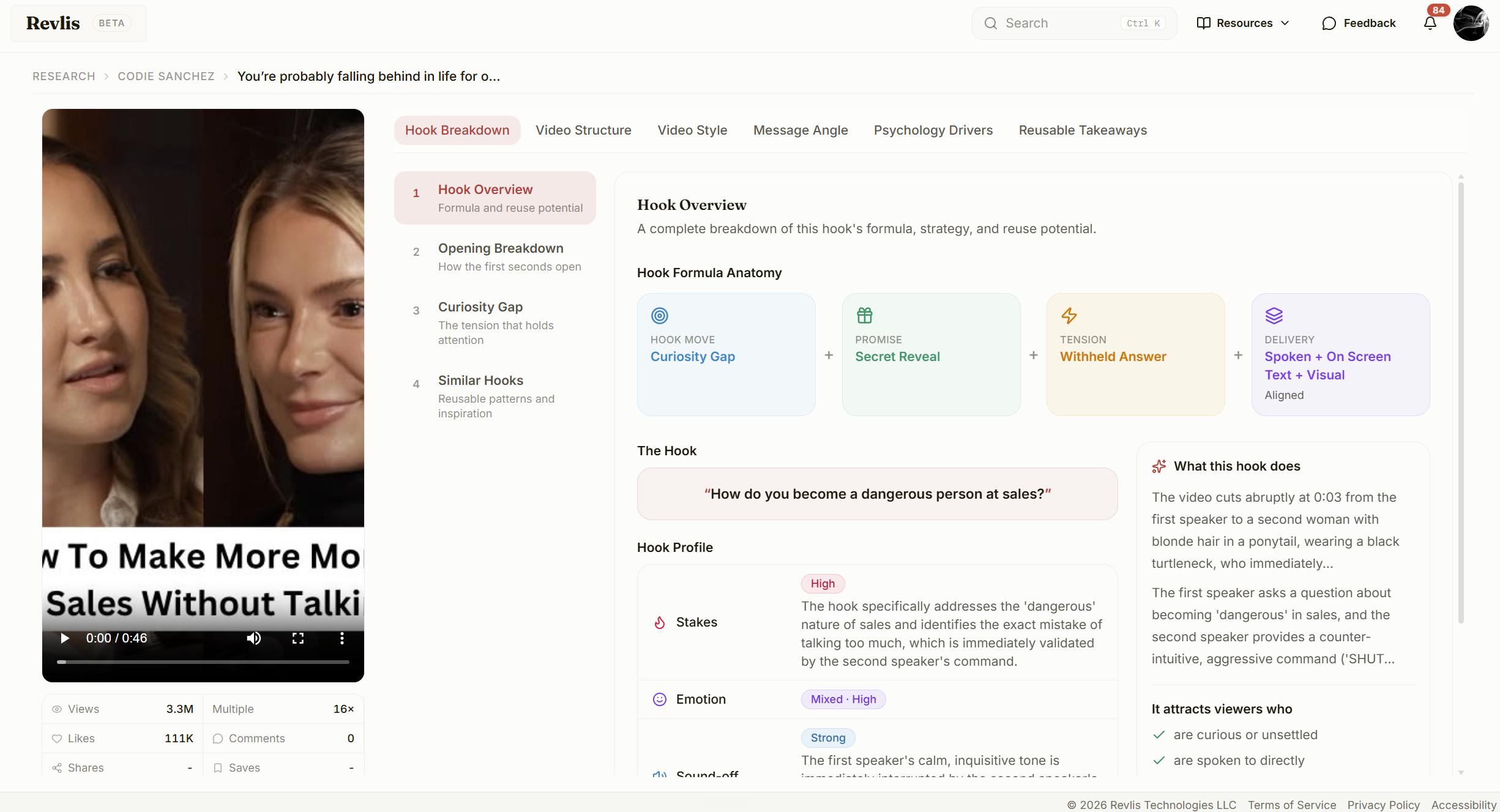
In this opening breakdown, the text hook, spoken hook, first-frame visual, pacing, cut, and audio context are kept together. That makes it possible to explain why the opening created tension instead of simply repeating what was said.
The next move is not “copy this video.” It is to identify the mechanism worth studying—then create an original version that fits your audience, offer, and voice.
When to use ChatGPT and when to use Revlis
Use ChatGPT when you already have the context and need help thinking, organizing, developing, or writing from it (although Revlis also helps with this as well). Revlis is also useful for turning research into an angle, a brief, or a script - in fact, it was trained to do this off best practices.
Use Revlis when you need to do the research itself:
study a public TikTok or Instagram post as a moving piece of content;
see why a post was an outlier in its own account;
compare the winning post with normal posts instead of guessing from a single link;
find related hooks, styles, structures, or creative patterns; and
save the breakdown so it can become an original next script later.
If you are trying to understand why a competitor's content works, start with the video, the account, and the psychology underneath it. That is the work Revlis was built to do.
Scope and limitations
ChatGPT capabilities, access, and integrations can change by plan, region, product surface, and release. This is not a benchmark of every ChatGPT workflow, and it does not claim ChatGPT can never inspect a video or public link. It is a practical explanation of why providing a transcript or a few screenshots is different from researching a public social-video account.
For the broader method, see What is a Viral Video Breakdown - How to Analyze Viral TikToks and Reels.
FAQs
Can ChatGPT analyze TikTok or Instagram videos?
No ChatGPT doesn't currently have the ability to analyze videos. If you want to paste a public TikTok or Instagram link and have the post analyzed as social content, Revlis is built for that workflow.
Are there tools that can analyze social media posts?
Yes. Revlis can analyze individual public TikTok and Instagram posts from a link. It looks at the hook and opening, text, spoken audio, visuals, pacing, curiosity, structure, style, message angle, psychology drivers, and reusable takeaways.
Sources
Reddit user report: “ChatGPT is almost perfect for me now except it...”↩︎
Reddit user report: “ChatGPT cheating me on analysis to TikTok videos”↩︎↩︎
OpenAI Help Center: ChatGPT Image Inputs FAQ↩︎
Reddit user report: “Using AI to analyse videos on TikTok, Instagram etc.”↩︎
Reddit user report: “I analyzed 50 viral Reels to find the pattern”↩︎
Reddit user report: “Looking for an AI tool that can watch video and explain what is going on”↩︎↩︎
Reddit user report: “Analyze videos with ChatGPT”↩︎
Reddit user report: “YouTube is so frustrating after trying out TikTok...”↩︎
Turn psychology into content that converts.
Explore the platform behind The RevList and start building smarter campaigns.